Step-by-step guide to creating a sales management app
Creating a sales management app is an essential step for businesses looking to streamline their sales processes, improve productivity, and drive growth. With the right tools, you can track leads, manage customer relationships, and analyze performance in real-time. In this guide, we'll walk you through the step-by-step process to create a sales management app that enhances efficiency and helps achieve your business goals.

1. Step 1: Define the purpose and key features
To create a sales management app, you will need to clearly define its purpose. Think about the specific challenges your sales team faces and how the app will address them. This step is essential for setting the foundation of your app’s functionality. For instance, you may want the app to focus on lead tracking, which will help sales representatives stay on top of potential clients and opportunities.
Additionally, integrating features like CRM (Customer Relationship Management) allows the team to have all client interactions and data in one place, ensuring a streamlined workflow. Another key feature to consider is reporting tools, which can provide valuable insights into sales performance, trends, and forecasting.
It is also important to plan for real-time data analytics to ensure that your sales team has access to up-to-date information, helping them make informed decisions on the spot. Defining these core features at the outset ensures that your app meets the needs of your team and supports your business goals effectively.
2. Step 2: Choose the right technology stack
Selecting the right technology stack is crucial to create a sales management app.. You need to choose tools and frameworks that can handle your app’s scale, features, and security needs. For the front-end, popular frameworks such as React Native or Flutter can be used to create responsive and user-friendly interfaces. These technologies support both iOS and Android platforms, reducing the time and cost of development.
On the back-end, you should focus on scalable cloud solutions like AWS or Google Cloud to ensure the app can grow with your business. The database you choose (SQL or NoSQL) will depend on the type of data your app will process. Make sure to prioritize security protocols to protect sensitive client information, such as using encryption for data storage and secure authentication methods. The right technology stack will not only enhance the performance of your app but also ensure long-term scalability and reliability.
Read more:
- E-commerce Mobile App Development Experience
- What Are Progressive Web Apps? Popular Examples
3. Step 3: Design a user-friendly interface
A clean, intuitive, and user-friendly design is absolutely critical when you create a sales management app. Since your sales team will rely on this tool every day to manage leads, update client information, and track their progress, the app must be designed to make these actions quick, easy, and seamless.
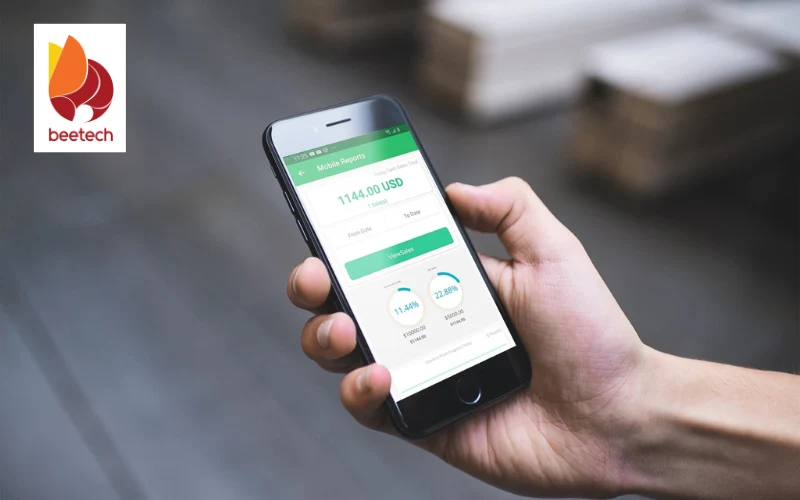
Start by mapping out the user journey carefully - identify the most common tasks your salespeople need to accomplish and ensure these actions are always within easy reach. For example, adding a new lead or scheduling a follow-up meeting should only require a few straightforward steps, supported by clear instructions and intuitive layouts.
When you create a sales management app, special attention must be given to form design and navigation structure. Forms for capturing sales information should be short, logical, and easy to complete, helping your team avoid errors and save valuable time. Navigation menus should be simple and consistent across the app, enabling users to move between sections without confusion.
Furthermore, because salespeople often work remotely or travel between meetings, the app must be fully mobile-responsive. A responsive design ensures that whether they are using a smartphone, tablet, or laptop, the app automatically adjusts to the device and delivers a smooth, functional experience.
Visual aesthetics are just as important when you create a sales management app. A well-designed interface that reflects your brand, through consistent colors, fonts, and icons - can make a powerful impression and increase user engagement. A professional, modern design builds trust and helps your sales team feel confident when using the tool.
Keeping the design simple and uncluttered is crucial: minimize distractions, use clear visual hierarchies, and guide users naturally to complete their tasks. Effective use of white space, meaningful icons, and well-organized content all contribute to a clean, efficient interface that boosts focus and productivity.
4. Step 4: Create a sales management app feature
Once you have your design and technology stack in place, it's time to begin developing the core features of your sales management app. Focus on developing the most important functionalities first, such as CRM integration, lead tracking, and reporting.
These features will form the backbone of the app and directly impact its effectiveness. Be sure to incorporate automated tools, such as reminders for follow-up tasks or notifications about important sales events, to help sales representatives stay on top of their duties.
In addition, integrate communication tools like chat or email to facilitate direct communication between team members. It’s also crucial to ensure that the app is easily scalable, meaning that as your sales team or customer base grows, the app can handle the increased load without compromising performance. Testing each feature as you go is essential to ensure functionality and catch any bugs early.
5. Step 5: Test and optimize the app
Before fully rolling out your newly created sales management app to the entire team, it is absolutely critical to go through a thorough and well-organized testing phase. Start with unit testing to verify that each individual component of the app, such as client record management, sales tracking, or task assignment features, functions correctly on its own.
Once unit testing is completed, move on to integration testing to ensure that different parts of the system communicate properly and that workflows, such as updating a client profile and automatically reflecting changes in the sales report, happen without errors.
After successful integration testing, proceed with user acceptance testing (UAT) by involving a small group of your sales team members. Let them use the sales management app in real-world scenarios to identify any usability issues, feature gaps, or hidden bugs that might affect daily operations. Gathering detailed feedback from actual users at this stage is crucial for making final adjustments that truly match the needs of your sales process.
Additionally, make sure to test the app across different devices and platforms to guarantee full compatibility and optimal performance, whether it is accessed via smartphones, tablets, or desktops. Based on the feedback collected during UAT, take time to refine the user experience (UX) - improving navigation flow, simplifying key actions, and ensuring fast, reliable performance.
Remember that creating a sales management app isn’t just about building features; it’s about delivering a tool that feels intuitive and helpful for every user. After launch, continuous monitoring and optimization remain essential. Actively track app performance, respond quickly to emerging issues, and roll out regular updates to enhance stability, security, and functionality.

6. Step 6: Launch and provide ongoing support
After successfully creating your sales management app, the next critical step is to roll it out across your sales team in a structured and strategic manner. It’s advisable to plan a phased launch, starting with a small group of pilot users to gather real-world feedback, before expanding the deployment organization-wide. To support this process, make sure to provide comprehensive user guides, easy-to-follow video tutorials, and set up a dedicated support team to assist users and address any questions promptly. This preparation ensures that the team can quickly adapt to the new tool with minimal disruption.
A gradual rollout approach helps to identify and resolve issues early while giving users time to familiarize themselves with the new system at a comfortable pace. This significantly improves the adoption rate and sets the stage for the app to deliver real, measurable benefits to your sales operations.
Once the sales management app is fully launched, ongoing support and maintenance become crucial. It’s important to establish a systematic feedback loop from users, regularly update features, fix bugs, and continuously optimize the app based on practical needs.
By doing so, you ensure that the sales management app remains stable, effective, and aligned with the latest technological trends as well as evolving customer behaviors. This commitment to continuous improvement will help your business stay competitive and achieve sustainable growth over the long term.
7. Conclusion
To create a sales management app, you need a strategic investment. By following the right steps - from defining key features to testing, launching, and providing ongoing support - you can develop an app that meets your team's specific needs and adapts to future demands. Whether you're looking to integrate CRM systems, optimize sales processes, or offer real-time analytics, having a robust sales management app in place is crucial for staying competitive.
If you're ready to take your sales operations to the next level, BeetechSoft is the partner you need. Our team of experts specializes in building custom solutions tailored to your business, ensuring that your app is not only functional but also scalable and user-friendly. Follow BeetechSoft today for more insights, expert advice, and high-quality software development solutions to turn your ideas into reality!